
Brazil Visa Status: How to Check Your eVisa Application
After submitting your Brazil eVisa application through the official portal, the waiting period begins. Most applicants receive their visa within 3 to 5 business days, but processing can take up to 10 business days or longer during peak travel seasons. Knowing how to check your Brazil visa status keeps you informed and helps you plan your trip with confidence.
This guide explains every method available to track your Brazil eVisa application status, what each status message means, and what to do if your application is delayed or denied.
How to Check Your Brazil eVisa Application Status Online
The primary way to check your Brazil visa status is through the official eVisa portal at brazil.vfsevisa.com. Here is the step-by-step process:
Step 1: Go to the Official Portal
Open your web browser and navigate to brazil.vfsevisa.com. This is the only official website where you applied for your eVisa. Make sure the URL is correct – phishing sites sometimes use similar-looking domain names to steal personal information.
Step 2: Log Into Your Account
Click the “Sign In” or “Login” button on the homepage. Enter the email address and password you used when you created your account during the application process. If you have forgotten your password, click “Forgot Password” to reset it via email.
Step 3: Navigate to Your Application
Once logged in, you will see your dashboard displaying your application(s). Click on the specific application you want to check. If you applied for multiple family members, each application will appear as a separate entry.
Step 4: View Your Status
Your current application status will be displayed on the application detail page. The status updates automatically as your application moves through the review process.
Brazil eVisa Application Status Meanings
When you check your Brazil visa status, you may see one of several status indicators. Here is what each one means:
| Status | What It Means |
|---|---|
| **Submitted** | Your application has been received and is in the queue for review. No action is needed from you. |
| **Under Review** | A consular officer is actively reviewing your application and supporting documents. |
| **Additional Information Required** | The consular office needs more documents or clarification. Check your email for specific instructions. |
| **Approved** | Your eVisa has been granted. You can now download your visa PDF from the portal. |
| **Denied** | Your application was not approved. Check your email for the stated reason. You may reapply. |
| **Expired** | Your application window has closed without a decision, or your previously issued eVisa has expired. |
What to Do if Your Status Shows “Under Review”
An “Under Review” status is completely normal. This is the standard stage where most applications spend the majority of their processing time. The Brazilian consular team reviews each application manually, checking passport details, photo compliance, and travel information against security databases.
During this stage, you do not need to take any action. Simply check back periodically, though the portal will also send you an email notification when the status changes.
What to Do if Additional Information Is Required
If your status changes to “Additional Information Required,” you should:
- Check your email inbox (and spam/junk folder) immediately for a message from the eVisa portal
- Log into your account to see if there are specific instructions or upload fields
- Submit the requested information as quickly as possible – delays in responding can extend your processing time significantly
- After submitting additional documents, your application will return to “Under Review”
Common reasons for additional information requests include a passport photo that does not meet specifications, unclear passport scan, or inconsistent information between your application and submitted documents.
How Long Does Brazil eVisa Processing Take?
The official processing time for a Brazil eVisa is up to 10 business days from the date of submission. However, processing times vary depending on several factors:
| Scenario | Typical Processing Time |
|---|---|
| Standard application | 3-5 business days |
| Peak season (Dec-Mar, Jun-Jul) | 5-10 business days |
| Additional information requested | 10-15 business days (after response) |
| High-security screening | Up to 20 business days |
Business days do not include weekends or Brazilian public holidays. If you submitted your application on a Friday evening, the 10-business-day clock starts on the following Monday.
When Should I Check My Status?
There is no need to check your status multiple times per day. The portal sends an email notification whenever your application status changes. A reasonable checking schedule is:
- Days 1-3: No need to check – your application is likely still in the queue
- Days 3-5: First check – many approvals come through in this window
- Days 5-7: Second check – if still under review, this is normal
- Days 7-10: Daily check recommended – you should have a decision soon
- After day 10: Check email for any communication from the portal; consider contacting support
How to Download Your Approved Brazil eVisa
Once your Brazil visa status shows “Approved,” you should download your eVisa immediately:
- Log into your account at brazil.vfsevisa.com
- Navigate to your approved application
- Click the “Download eVisa” or “Print Visa” button
- Save the PDF file to your device
- Print at least two physical copies to carry during your trip
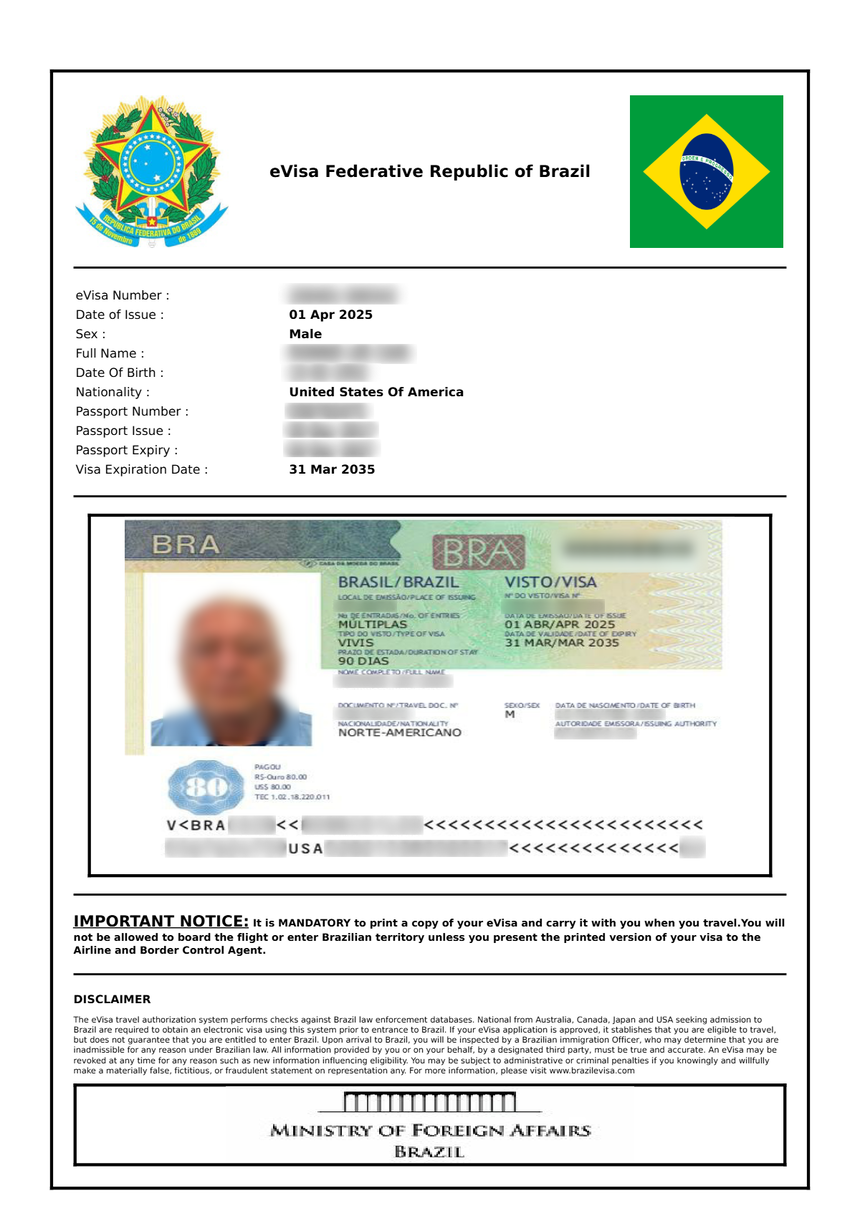
The eVisa PDF contains your personal details, visa number, validity dates, and a QR code that immigration officers can scan. While the visa is electronically linked to your passport, carrying a printed copy is strongly recommended as a backup in case of system outages at the airport.
What If the Download Button Is Not Working?
If you cannot download your eVisa after approval:
- Try a different web browser (Chrome, Firefox, or Edge are recommended)
- Clear your browser cache and cookies
- Disable any ad-blocking browser extensions
- Try accessing the portal from a different device
- If the problem persists, contact the eVisa support team through the portal’s contact form
Brazil Visa Status by Email
In addition to checking online, the eVisa portal sends automated email notifications at each stage of the process. You should receive emails for:
- Application submission confirmation
- Payment receipt
- Status changes (Under Review, Approved, Denied)
- Requests for additional information
- Final approval with download instructions
Not Receiving Email Notifications?
If you are not receiving emails from the eVisa portal:
- Check your spam or junk folder – automated emails from government portals are sometimes filtered
- Add the portal’s email address to your contacts or safe senders list
- Verify the email address on your application matches the one you are checking
- Log into the portal directly to check your status – do not rely solely on email notifications
- If you used a work email, corporate firewalls may block the messages. Consider checking with your IT department.
Brazil Visa Status: What If My Application Is Denied?
If your Brazil visa status changes to “Denied,” you will typically receive an email explaining the reason. Common denial reasons include:
- Passport validity issues: Your passport expires within six months of your intended entry date
- Photo non-compliance: The uploaded photo does not meet Brazil’s specifications (wrong size, background, or quality)
- Incorrect personal information: Mismatched name spelling, wrong passport number, or incorrect date of birth
- Incomplete application: Missing required fields or documents
- Previous immigration violations: Overstaying a prior visa in Brazil or other countries
- Criminal record: Certain serious criminal convictions may result in denial
Can I Reapply After a Denial?
Yes. A denied eVisa application does not permanently bar you from entering Brazil. You can submit a new application at any time. However, there are important considerations:
- You must pay the $80.90 fee again – the fee is non-refundable
- You should correct the issue that caused the denial before reapplying
- If your passport was the problem, renew it first
- If your photo was rejected, get a new photo that meets the requirements
- If additional information was requested and you did not respond in time, gather the documents and reapply
Can I Appeal a Brazil eVisa Denial?
There is no formal appeal process for eVisa denials. The recommended approach is to correct the issue and submit a new application. If you believe the denial was made in error and you have corrected all potential issues, you may also consider contacting a Brazilian consulate directly for clarification.
Brazil eVisa Login Troubleshooting
Having trouble logging in to check your Brazil visa status? Here are solutions for common login problems:
Forgot Your Password
- Go to the login page at brazil.vfsevisa.com
- Click “Forgot Password” or “Reset Password”
- Enter your registered email address
- Check your email for a password reset link
- Create a new password and log in
If you do not receive the reset email within 15 minutes, check your spam folder.
Account Locked
If you enter the wrong password multiple times, your account may be temporarily locked. Wait 15-30 minutes and try again. If you still cannot access your account, contact the portal’s support team.
Email Changed Since Application
If you no longer have access to the email address used during your application, contact the eVisa support team through the portal. You will need to verify your identity with your passport number and other personal details.
Can I Check Someone Else’s Brazil Visa Status?
You can check the status of another person’s application only if:
- You have their login credentials (email and password), OR
- You are a parent or legal guardian who applied on behalf of a minor child using your own account
The eVisa portal does not provide status checks by passport number alone. This is a privacy measure to protect applicants’ personal information. Travel agents and visa services who applied on behalf of clients will have their own login credentials for the portal.
Brazil Visa Status for Different Application Types
While the eVisa (VIVIS) is the most common application type for tourists and short-term business travelers, other Brazilian visa types follow different processes:
| Visa Type | How to Check Status |
|---|---|
| eVisa (VIVIS) | Online at brazil.vfsevisa.com |
| VITEM I-V (Embassy visas) | Contact the Brazilian embassy or consulate where you applied |
| Diplomatic/Official | Through the sponsoring government agency |
| Work Visa (VITEM V) | Brazilian consulate or employer sponsor |
For embassy-processed visas (VITEM categories), there is no centralized online tracking system. You must contact the specific embassy or consulate directly, usually by email or phone. Response times vary, but most consulates provide status updates within a few business days of inquiry.
Tips for a Smooth Brazil Visa Status Experience
- Save your login credentials. Write down your email and password used for the eVisa portal. You will need them to check your status and download your visa.
- Apply early. Submit your application at least 4 weeks before your travel date to avoid stress from processing delays.
- Check your email regularly. The portal sends important notifications by email, including requests for additional information with deadlines.
- Use the official portal only. Always access brazil.vfsevisa.com directly by typing the URL. Do not click links from unsolicited emails.
- Keep your passport handy. You may need your passport number to verify your identity when contacting support.
- Download and print your eVisa immediately upon approval. Do not wait until your departure date.
- Screenshot your approval. In addition to downloading the PDF, take a screenshot of the approval page as an additional backup.
Frequently Asked Questions
How do I check my Brazil visa status without logging in?
You cannot check your Brazil eVisa status without logging into the portal. The system requires authentication to protect your personal information. If you have lost your login credentials, use the password reset feature on the portal.
Does Brazil send visa status updates by text message?
No. The official eVisa portal sends status updates by email only. There is no SMS or text message notification system. Be cautious of any text messages claiming to be from Brazilian immigration – these are likely scams.
Can I check my Brazil visa status using my passport number only?
No. The eVisa portal does not offer a passport-number-only lookup. You must log into your account to view your application status. This protects applicants’ privacy and prevents unauthorized access to visa information.
How will I know if my Brazil eVisa is approved?
You will receive both an email notification and see the status change to “Approved” on your portal dashboard when you log in. The email will include instructions to download your eVisa PDF.
What does it mean if my Brazil visa status has not changed in 10 days?
If your application has been under review for more than 10 business days without a decision, this may indicate additional security screening or a high-volume processing period. Check your email for any communication from the portal, and if there is none, consider reaching out to the support team through the portal’s contact form.
Can I travel to Brazil while my eVisa is still processing?
No. You must have an approved eVisa before boarding your flight to Brazil. Airlines will verify your visa status during check-in, and you will be denied boarding without a valid visa. Brazilian immigration will also deny entry upon arrival if you do not have an approved visa.
Is my Brazil eVisa linked to my passport electronically?
Yes. The eVisa is electronically linked to your passport number in Brazil’s immigration system. Immigration officers can verify your visa by scanning your passport. However, you should still carry a printed copy of your eVisa PDF as a backup.
What happens if I get a new passport after my eVisa is approved?
Your eVisa is linked to the specific passport number on your application. If you get a new passport, your eVisa will not transfer to the new passport. You must apply for a new eVisa using your new passport details and pay the fee again.
Check Your Brazil Visa Status Now
Ready to check your application? Log into the official portal at brazil.vfsevisa.com to view your current status, download your approved eVisa, or submit additional information if requested.
If you have not yet applied, visit our guides on Brazil visa requirements, how to apply for a Brazil eVisa, and Brazil visa fees to get started.